
How To Dispute Google Reviews & Get Them Removed
If you are a small business owner who has recently received a negative review on your Google Business Profile, you’re probably wondering how you can get the review taken down so other customers don’t come across it and get the wrong idea about your business. Unfortunately, there isn’t a way to directly remove or delete reviews on your Google Business Profile, but you can “Report” negative reviews if they fall under one of the criteria of what Google deems to be in violation of their review policies. There are several different things you can report a review for in hopes of it getting taken down, each of which we’ll cover below!

Reasons To Report a Review On Your Google Business Profile
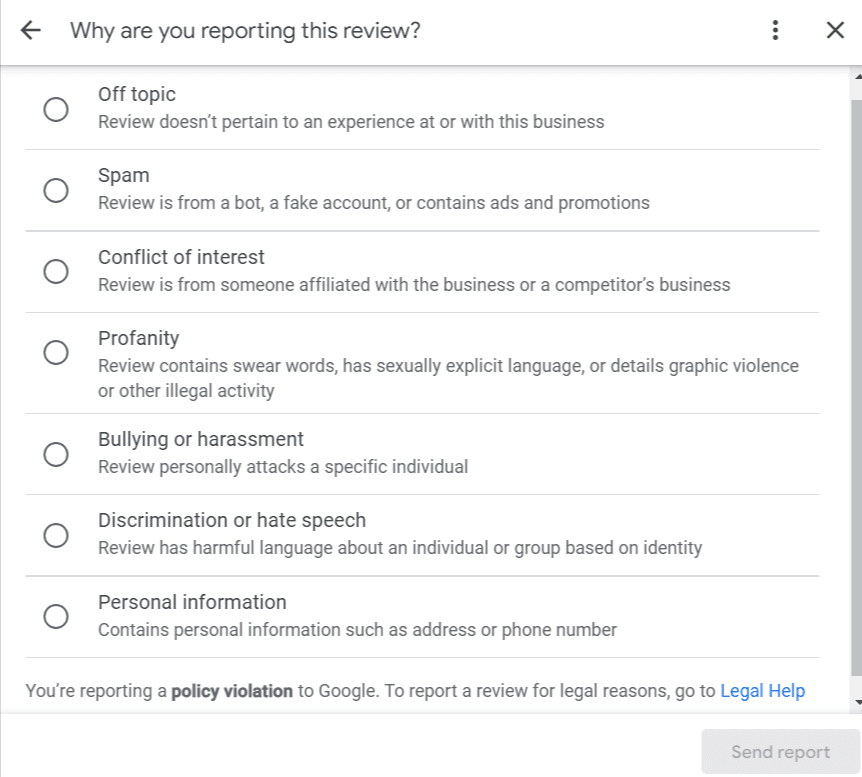
If a negative review has been left on your Google Business Profile that you’d like to report so Google can take it down, the review must fall under one of the following categories:
- Off Topic: If a review left on your Google Business Profile has nothing to do with your business, you can report the review as “Off Topic”, then Google may remove it. (Example: Someone mistakenly leaves a negative review on your Google Business Profile when they were trying to leave a review for a business with a similar name).
- Spam: If a review left on your Google Business Profile appears to be from a “bot” or fake account, Google may remove it from your profile once the review has been reported. (Example: A review that includes an advertisement or promotion for a different business).
- Conflict of Interest: Negative reviews left by a competitor or someone who is affiliated with the business may be removed by Google once reported. (Example: A negative review left by a former employee).
- Profanity: Reviews that contain swear words or explicit language may be removed once the review has been reported to Google. (Example: A negative review that contains sexually explicit language).
- Bullying or Harassment: Reviews that contain personal attacks at a specific individual may be removed by Google once flagged. (Example: A negative review that calls a specific employee out by name & is a personal attack).
- Discrimination or Hate Speech: Negative reviews that contain harmful language about an individual or group based on identity. (Example: A customer leaves a negative review because employees were speaking in a different language).
- Personal Information: A review contains personal information about somebody, like a phone number or an address. (Example: A customer leaves a review that includes an employee’s name and phone number).
How To Report a Review On Your Google Business Profile
If there is a negative review on your Google Business Profile that meets one or more of the above mentioned criteria, you can report it to Google so it can be taken down. In order to do this, simply locate the specific review within the reviews section of your Google Business Profile, click the “Info” icon (Google Search) or “Three Dots” icon (Google Maps), then select “Flag as inappropriate”. You’ll then be prompted to choose a reason for reporting the review: Off Topic, Spam, Conflict of Interest, Profanity, Bullying/Harassment, Discrimination/Hate Speech, or Personal Information. Once you’ve selected your reasoning for reporting the review, simply click “Send Report”. You can check the status of reviews you’ve reported by visiting Google’s “Reviews Management Tool”.


Contact Boston Web Marketing!
If you have any questions about Google reviews or any other search engine optimization strategies, please don’t hesitate to contact our team at Boston Web Marketing! Our SEO specialists help businesses in almost every industry achieve higher search results! Give us a call today at (857) 526-0096 or fill out the contact form on our website, and we’ll get back to you as soon as possible!